Notes that remember every word.
Jotry is a calm, private notebook for your phone. Headings, lists and checklists take shape as you write, every version of every note is kept, and it all stays on your device.
Coming to Android and iPhone. Take the tour →

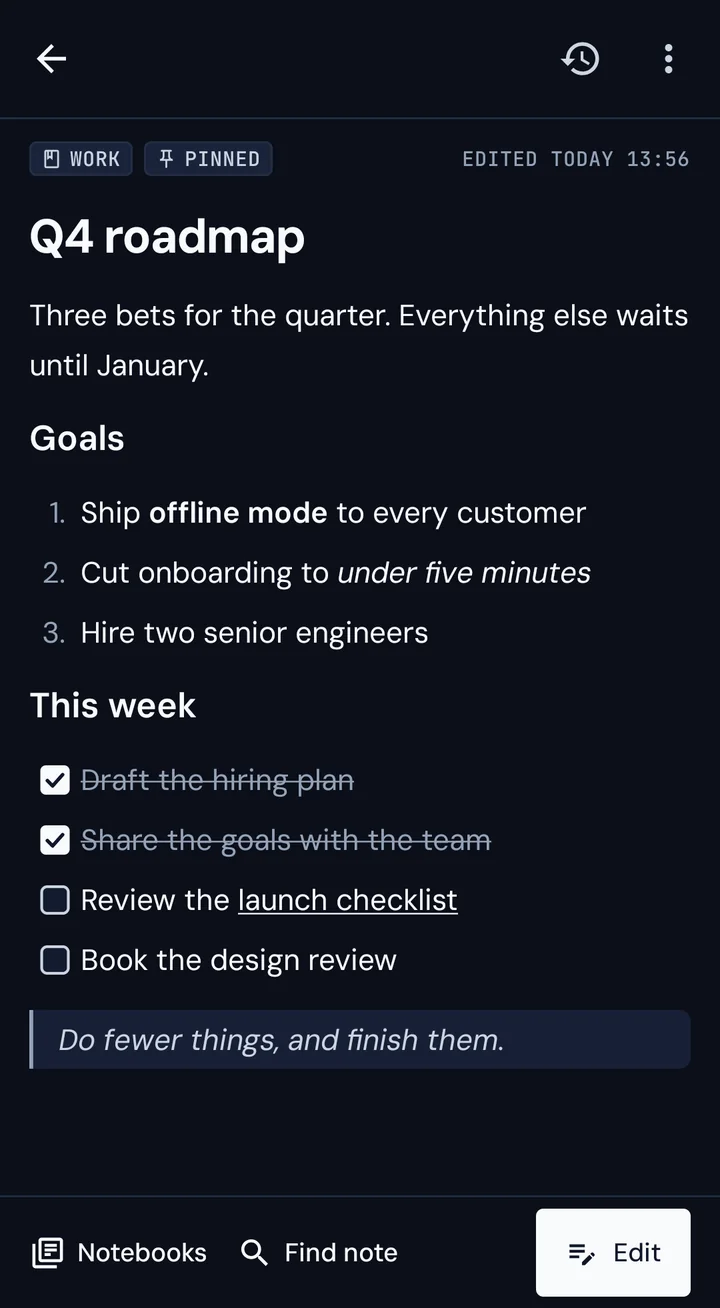
Formatting, one tap away
Headings, lists, checklists and quotes are on the bar above the keyboard, and your note looks right straight away.
Never lose a word
A version for every minute you write. Look back, compare and restore, and the note you have now is never erased.
Yours, and only yours
No account and no tracking. Your notes stay on your phone, and when you sync, they're encrypted end-to-end.
Everything a notebook should be. Nothing it shouldn't.
What you see is your note.
Make a heading, a list or a checklist with one tap, and it looks right straight away. There's no preview to switch to and nothing to tidy up later.
- A toolbar above the keyboard for headings, checklists, lists, quotes, code and links
- Notes save themselves. The green Saved stamp tells you when
- Checklists for your to-dos. Tick items off right in the note, without opening the editor

Catch it before it's gone.
Tap New note and you're writing, with no title to type and no notebook to choose. Or send something to Jotry from another app, and it becomes a note.
- Long-press the app icon for Quick capture
- Share a web page or an article to Jotry and read it later as a note
- Titles write themselves, on your phone

Go back to any minute.
Jotry keeps a version of a note for every minute you spend writing it. Open one and see exactly what changed, with additions in green and removals struck through.
- Restore an old version, and the one you replaced stays in the history
- Copy any version into a new note
- Deleted notes wait in the trash with their whole history

Notebooks, like volumes on a shelf.
Keep related notes together in notebooks, or don't. Notes you don't file sit right on the home screen. Pin what you use most, and archive what you've finished.
- Swipe in from the edge to reach every notebook
- Press and hold to select several notes, then move or delete them together
- Every delete and move can be undone, with no "Are you sure?"

Your notes, connected.
Type [[ to link one note to another, and tap the link to jump there. Find note gets you to any note in a few letters, and search looks through titles, text and checklists.
- Links follow a note when you rename it
- Back and forward arrows retrace the notes you visited
- Search highlights exactly where it found your words

Encrypted before it leaves your phone.
Turn on Backup & sync to keep an end-to-end encrypted copy of your notes and add your other devices by QR code. The keys stay on your devices, so the server can't read a word.
- Still no account: a 24-word recovery key brings your notes back
- Edits from two devices are merged paragraph by paragraph
- Share a note or a whole notebook with someone you trust

Easy on the eyes, day and night.
Archival paper by day, deep ink by night. Jotry follows your phone's setting.

Your notes are none of our business.
Jotry was built from the start so that nobody but you can read what you write. Not advertisers, not us.
Install it and start writing. There's no email, no password and no profile.
Notes live in the app's private storage, protected by your phone's encryption.
When you sync, notes are encrypted on your device. The server keeps only what it can't read.
Export everything as ordinary Markdown files, one folder per notebook. No lock-in.
Ready in five languages.
A quieter place to think.
Jotry is being tested on Android and iPhone now.